PDF Compression Quick Answer
To compress PDF files online, simply drag and drop your document into our free PDF compressor tool, allow the automated system to optimize your file size by reducing image resolutions and stripping unnecessary metadata, and download the compressed PDF. You can securely reduce PDF size online without software installations or quality loss.
Have you ever tried to upload a resume, a scanned document, or an assignment to an online portal, only to be hit with a frustrating red error message stating: "File size too large"? You are certainly not alone.
Most government websites, email clients like Gmail (which caps attachments at 25MB), and university submission portals have strictly enforced file size limits. If your PDF contains high-resolution images, heavy fonts, or scanned pages, it can easily exceed these limits. To bypass these restrictions quickly, you need to use a reliable tool to compress PDF files online.
Table of Contents
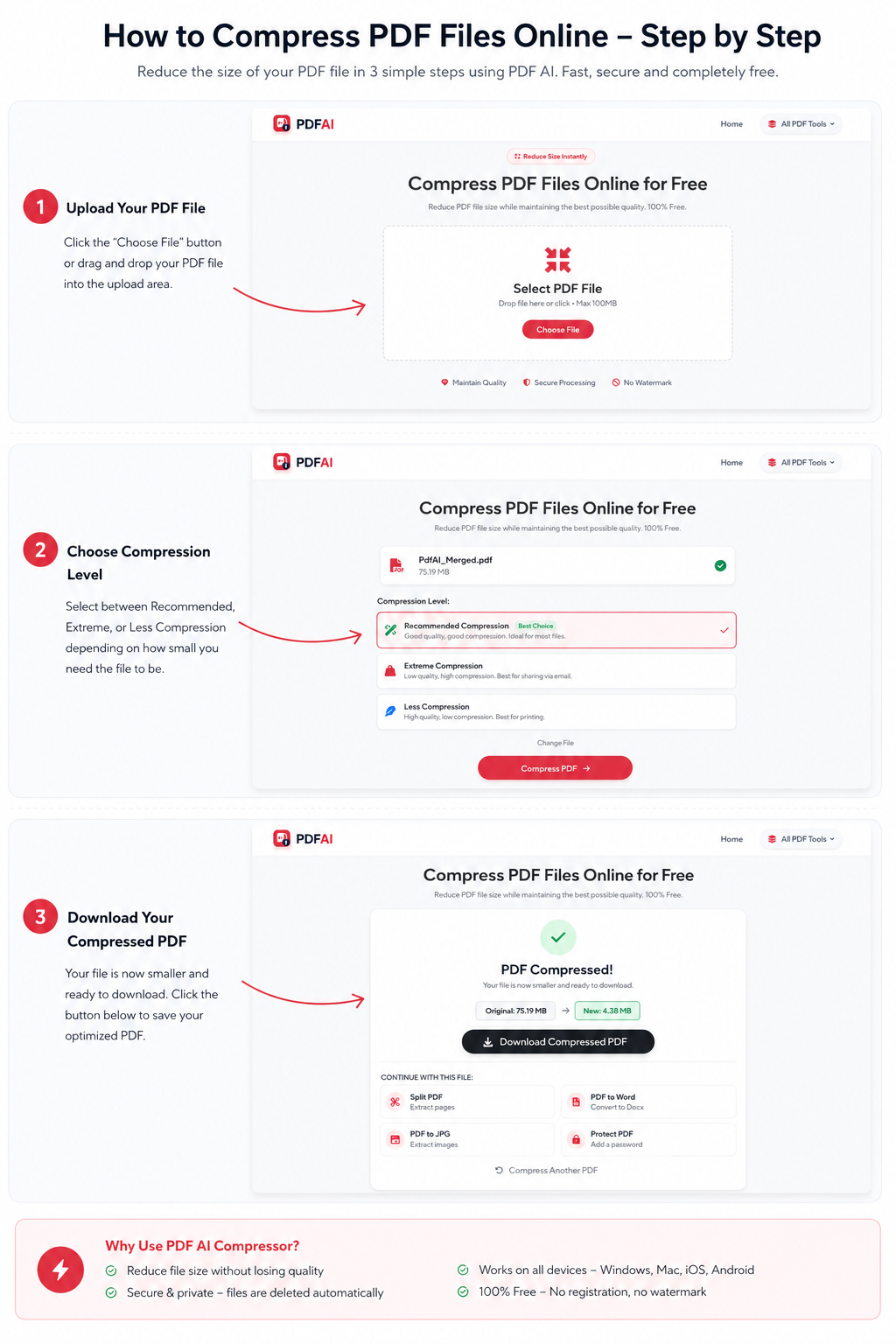
Step-by-step guide showing how to upload, compress and download an optimized PDF file using PDF AI.
Why Are PDFs So Large?
Before you learn how to reduce PDF size, it helps to understand why these files get so bloated in the first place. A standard text-only PDF should only be a few kilobytes. Here is what drives the size up:
- High-Quality Images: Scanned documents, photographs, and high-DPI charts take up massive amounts of space. This is the #1 culprit of bloated PDFs.
- Embedded Fonts: Some PDFs store entire font families inside the document so it looks identical on every machine.
- Hidden Data: Unnecessary metadata, author tracking logs, and deleted elements can bloat the file size invisibly.
When You Need PDF Compression
Millions of users search for a free PDF compressor every single day because digital storage and upload limits are a global standard. Here are the most common scenarios where compression is completely mandatory:
The Difference It Makes
Here is a real, measurable example of what our compress PDF online tool can achieve without noticeably dropping the visual quality of your document:
Not only do smaller files upload instantly, but they also save mobile data and open significantly faster for the recipient.
Want to shrink your PDF right now?
Try our free compression tool. Fast, secure, and absolutely no login required.
Compress PDF NowHow to Compress a PDF — 3 Simple Steps
Using PDF AI is incredibly simple. You don't need any technical skills, and the entire process takes less than ten seconds.
Understanding Compression Levels
Not all documents are created equal. When you use an advanced tool to reduce PDF size online, you usually encounter different levels of compression. Here is what they mean:
- Low Compression: Retains maximum visual quality. Best for printing. Reduces file size by roughly 20-30%.
- Medium (Recommended): The perfect balance. Images are slightly compressed, but text remains crystal clear. Best for emails and web uploads. Reduces size by 50-70%.
- Extreme Compression: Shrinks the file aggressively. Best for text-heavy documents where image quality doesn't matter. Can reduce size by up to 90%.
Why Choose PDF AI's Compressor?
There are countless compression utilities online, but PDF AI guarantees high performance while prioritizing your privacy. Let's compare our utility to standard free platforms.
| Feature | PDF AI Compressor | Other Free Tools |
|---|---|---|
| 100% Free | ||
| Zero Watermarks | ||
| Secure Auto-Delete | ||
| No Registration |
So next time you hit that annoying "File too large" error, you know exactly what to do. Use PDF AI's free compression tool and share your documents seamlessly.
Do More With Your Documents
Need to do more than just make your file smaller? Explore our full suite of free document manipulation tools:
Frequently Asked Questions (FAQ)
Is PDF compression actually free?
Yes, the PDF compression tool provided by PDF AI is completely free to use. There are no paywalls, hidden fees, or annoying watermarks stamped onto your optimized documents.
Does compression reduce document quality?
Our intelligent compression engine focuses on shrinking hidden metadata and optimizing images. While image DPI is slightly reduced, the text remains 100% vector-sharp, meaning for general reading and printing, the quality loss is completely unnoticeable.
Can I compress a PDF on my mobile phone?
Absolutely. Our tool is fully web-based. You can open your iPhone or Android browser, navigate to the compressor, select a file from your local storage, and download the smaller file instantly.
Is my file secure during the compression process?
Yes, your security is guaranteed. We process all uploads via robust 256-bit SSL encryption. We also run a strict auto-deletion protocol—your original and compressed files are permanently deleted from our servers right after you download them.
What is the maximum PDF size I can upload?
Our free tier accommodates standard, heavy documents with ease. Even if your scanned PDF is 50MB+, our system can handle the load and shrink it down to a fraction of its original size.
Can I compress a password-protected PDF?
To compress a locked file, the encryption must be removed first. You can use our Unlock PDF tool to strip the password, and then run the unlocked document through the compressor.
Will compressing my PDF change the formatting?
No. The layout, fonts, margins, and structure of your document will remain exactly the same. The only thing that changes is the underlying file size and image optimization data.
How much smaller will my file get?
It depends on the original content. If your PDF is mostly text, it might shrink by 10-20%. If your PDF contains heavy, unoptimized scanned images, it can easily shrink by 70-90%.