Merge PDF Quick Answer
To merge PDF files online, upload multiple PDF documents to our converter, arrange them in your desired order by dragging and dropping, click "Merge", and download the combined file. PDF AI lets you combine PDFs free without installing any software or dealing with watermarks.
Handling multiple scattered PDF documents can be an absolute nightmare. Whether you are applying for a job and need to send your resume, cover letter, and portfolio together, or you are compiling monthly financial reports for your boss, sending 10 different files looks highly unprofessional and guarantees confusion.
The ultimate solution? Join PDF documents into a single, highly organized, and seamless master file. By utilizing a free PDF merger, you can instantly turn a chaotic folder of files into one beautiful document that is easy to read, share, and print.
Table of Contents
Why You Should Merge Your PDFs
When you combine multiple PDFs, you aren't just saving digital space; you are vastly improving the workflow for both yourself and whoever receives the document. Here is why you need a PDF merger online:
- Looks Professional: Sending one organized file is infinitely better than cluttering an email inbox with dozens of confusing attachments.
- Easy Printing: You only have to hit "Print" once on a master document instead of opening, configuring, and printing multiple files individually.
- Prevents Confusion: Merging ensures the recipient reads the documents in the exact sequential order you want them to.
- Easier Archiving: Filing away one comprehensive project document on your hard drive is much easier than tracking a loose folder of disconnected pages.
The Difference It Makes
See exactly how choosing to merge PDF without software transforms your daily workflow and sharing capabilities:
Let's look at the best methods for sharing multiple files and why a PDF merger online wins every time:
| Sharing Method | Difficulty/Friction | User Experience |
|---|---|---|
| Emailing 5 PDFs Separately | Confusing for the recipient | |
| Sending a ZIP Folder | Requires extraction software | |
| Single Merged PDF Document | Seamless, open-and-read instantly |
Ready to combine your documents?
Try our free Merge PDF tool right now. Upload multiple files, reorder them via drag-and-drop, and merge them in seconds.
Merge PDFs NowCommon Reasons to Merge PDFs
Every day, thousands of professionals, students, and businesses use our tool to simplify their digital lives. Here are the most common scenarios where you need to combine PDF files:
How to Merge PDFs Online — 3 Simple Steps
You don't need expensive software like Adobe Acrobat to join your files. Follow these three simple steps to combine multiple PDF documents into a single organized file using PDF AI.
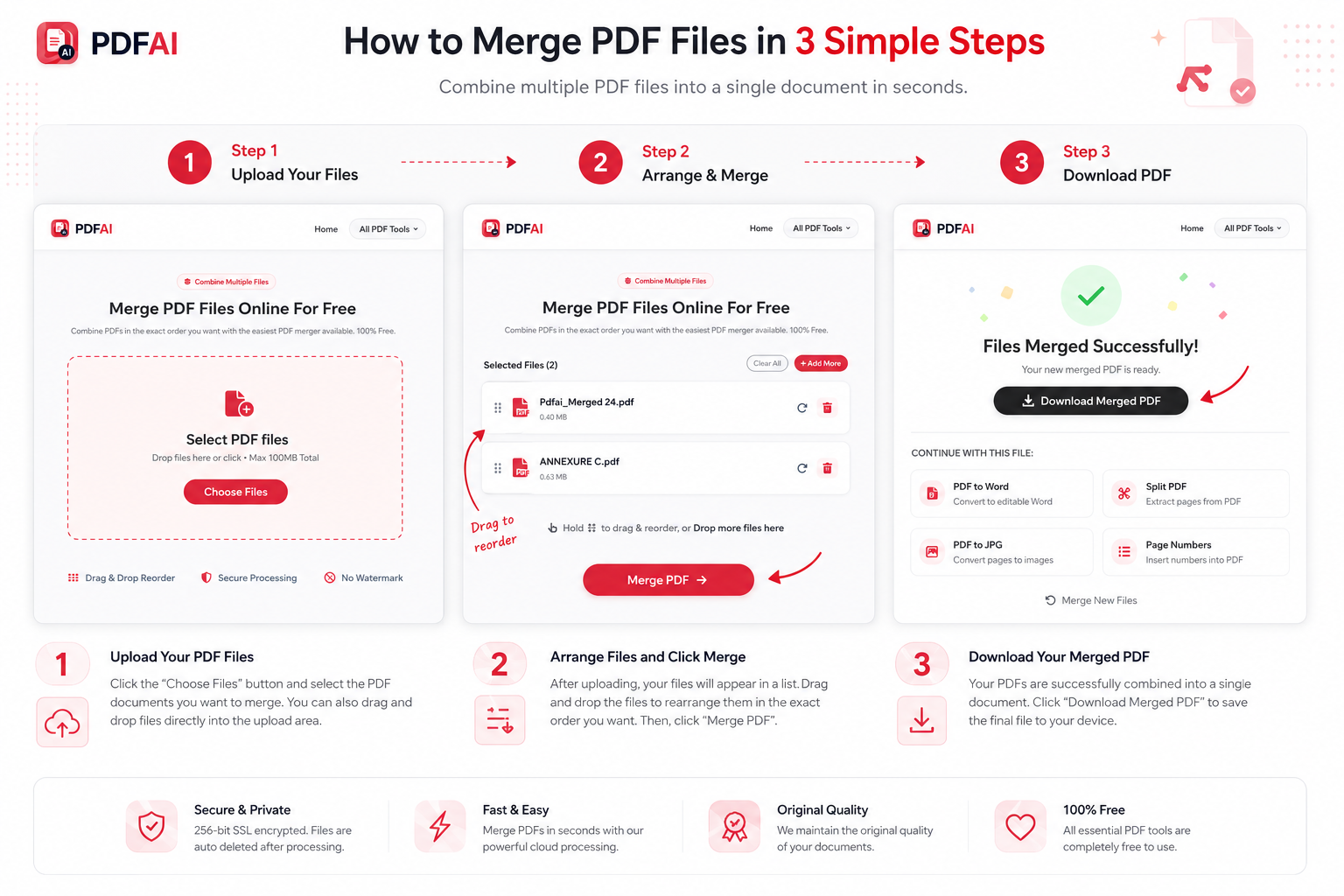
Upload files, reorder them, merge PDFs, and download the final comprehensive document.
Why PDF AI's Merge Tool?
While there are other options available, PDF AI stands out as a privacy-focused, truly free alternative. Here is a quick comparison of why you should choose us over other standard online utilities:
| Feature | PDF AI | Other Free Tools |
|---|---|---|
| 100% Free Access | ||
| Visual Drag-to-Reorder | ||
| Mobile Friendly | ||
| No Watermarks Added |
Do More With Your Documents
After you successfully merge PDF files, your document might be too large, or you might realize a file is locked. Don't worry, PDF AI is a complete suite of document tools. Enhance your workflow with these free utilities:
Frequently Asked Questions (FAQ)
Is Merge PDF free?
Yes, the Merge PDF tool by PDF AI is completely free to use. There are no hidden fees, forced premium subscriptions, or unexpected watermarks stamped onto your combined document.
Can I merge PDFs on iPhone?
Absolutely. You do not need a computer. Simply open your iPhone browser (Safari or Chrome), go to our Merge PDF tool, select the files from your iOS Files app, and download the combined document straight to your phone.
Can I merge PDFs on Android?
Yes! Our platform is web-based, meaning it works flawlessly on any Android device. Just upload your PDFs via your mobile browser and merge them without downloading any third-party apps.
Is my data secure?
Security is our top priority. All files uploaded to our servers are protected using 256-bit encryption. Furthermore, we operate on a strict auto-deletion policy, meaning your files are permanently erased from our servers shortly after processing.
Can I rearrange pages before merging?
Yes. Once you upload multiple files into the tool, you will see visual blocks representing each file. You can simply drag and drop these blocks to arrange them in the exact order you want them to appear in the final combined PDF.
How many PDFs can I merge?
Our free tier allows you to merge a generous number of files at once, easily accommodating standard business, legal, and academic needs like combining 10 to 20 files together smoothly.
Can I merge password protected PDFs?
If a PDF is password protected against editing or viewing, you must unlock it first. You can use our Unlock PDF tool to remove the restriction, and then safely upload it into the Merger tool.
Does Merge PDF work on Mac?
Yes, our online PDF merger is fully compatible with macOS. Whether you use Safari, Chrome, or Firefox on your MacBook or iMac, you can merge your files instantly without relying on the native Preview app.