PDF to JPG Quick Answer
To convert PDF to JPG online, simply upload your PDF file to the converter, wait a few seconds for automatic processing, and download each page as a separate high-resolution JPG image. PDF AI is a completely free PDF to JPG converter that outputs crisp images without any watermarks or software installation.
PDFs are the undisputed gold standard for preserving formatting and printing documents securely. In fact, according to Adobe, billions of PDF files are opened every single year. However, they have one massive flaw: they are terrible for quick, visual sharing on modern social platforms.
You cannot upload a PDF directly to an Instagram post, use it as a WhatsApp status, or embed it seamlessly into a web page. If you want to share a digital certificate, a multi-page resume, or a visual presentation online, you need to convert PDF to image format. Converting your PDF to JPEG or JPG is the easiest and most effective way to make your documents universally readable—especially considering that more than 90% of smartphones natively support JPG viewing without any third-party apps.
Table of Contents
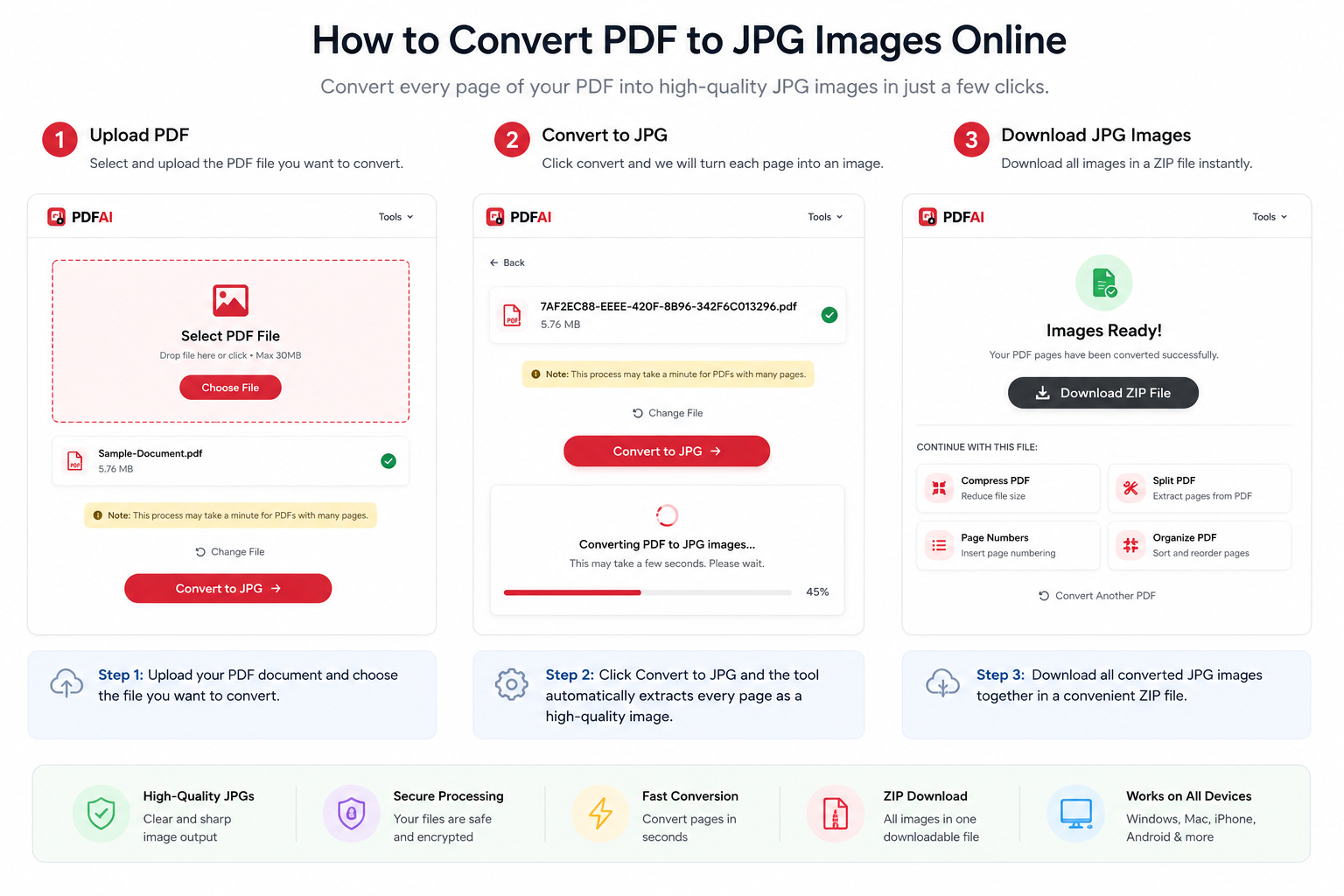
Transform rigid PDF documents into shareable, high-quality JPG image files instantly with our free converter.
Why Convert PDF Files to JPG Images?
Many users wonder why they shouldn't just take a screenshot of their PDF on their phone or computer. The problem is that screenshots drastically reduce image quality, cut off page margins, and ultimately look highly unprofessional. Using a dedicated PDF to JPG online tool ensures that every single pixel, font, and graphic is preserved perfectly.
Here are the primary reasons you should use a PDF to JPG Converter:
- Social Media Compatibility: Major platforms like Facebook, Twitter, LinkedIn, and Instagram do not support direct PDF uploads. They strictly require image formats like JPG.
- No Special Software Needed: While opening a PDF requires a specific viewer app (like Adobe Acrobat), absolutely every smartphone and computer natively opens a JPG image instantly.
- Email & Messaging: Sending images in an email body or a WhatsApp chat allows the recipient to see the content immediately without downloading an attachment.
- Extract JPG from PDF: Sometimes you only need a specific graph or visual from a large document to use in a presentation.
Ready to convert your PDF right now?
Turn your documents into high-quality images in seconds without losing formatting.
Convert PDF to JPG NowFeature Comparison: PDF vs JPG
Still not sure if you should convert your file? Here is a breakdown of where JPG significantly outperforms PDF in daily digital tasks:
| Feature / Use Case | PDF Document | JPG Image |
|---|---|---|
| Instagram / Facebook Upload | ||
| WhatsApp Status / Stories | ||
| Universal Open Support | ||
| Text Editing & Highlighting |
Common PDF to JPG Use Cases
Our users rely on our tool to convert PDF pages to JPG for a variety of professional and personal reasons. Long-tail keyword searches prove that people need specific document solutions:
Why PDF AI Instead of Other PDF to JPG Converters?
There are countless converters on the internet, but not all of them respect your file quality, privacy, or time. PDF AI is built for professionals. Let's see how we stack up against the competition:
| Feature | PDF AI | Other Free Tools |
|---|---|---|
| 100% Free | ||
| Watermarks Added? | ||
| Mobile Support | ||
| Bulk ZIP Download |
How to Convert PDF to JPG Online Free (Step-by-Step)
Converting your documents takes less than 10 seconds. You don't need any technical skills to get started:
- Upload Your PDF: Go to our PDF to JPG Converter. Click "Select PDF" or drag and drop your file into the secure upload zone.
- Automatic Processing: Our high-speed cloud servers will instantly scan your document and seamlessly convert each PDF page into a high-resolution JPG image.
- Download as ZIP or Individual: Once the conversion is complete, you will see a preview. Click download to save them individually, or hit the ZIP button to download all pages inside one folder.
PDF to JPG vs PDF to PNG: Which is Better?
While you are converting your files, you might wonder if you should use JPG or PNG. Both are excellent image formats, but they serve different purposes. JPG (or JPEG) is heavily optimized for smaller file sizes, making it the absolute best choice for sharing on social media, messaging apps, or email attachments. PNG, on the other hand, is a lossless format that supports transparent backgrounds, making it better for high-end graphic design or extracting logos. For 99% of general sharing needs, JPG is the superior and more storage-efficient format.
Do More With Your Documents (Internal Links)
PDF AI is a complete suite of document tools. Enhance your document workflow by exploring our other free utilities:
Frequently Asked Questions (FAQ)
Can I convert PDF to JPG without losing quality?
Yes! While JPG is technically a compressed format, our PDF AI converter extracts your PDF pages at a very high resolution (high DPI). For standard viewing on screens, social media, or even printing, you will not notice any drop in visual quality.
How do I convert a PDF to JPG on iPhone?
Converting on an iPhone is incredibly easy. Simply open Safari or Chrome, go to gopdfai.com/tools/pdf-to-jpg, tap upload, select the PDF from your iPhone "Files" app, and download the resulting images directly to your Photos app.
How do I convert PDF to JPG on Android?
On any Android device, open your web browser, navigate to our free converter, and upload your PDF document. The process happens entirely in the browser, so you don't need to download any sketchy third-party apps from the Play Store.
Can I convert PDF to JPG offline?
Currently, PDF AI operates as a cloud-based online converter to ensure you always get the fastest processing speed without hogging your computer's resources. You will need an active internet connection to use our tool.
Is PDF to JPG safe?
Absolutely. Safety is our top priority. Our platform uses end-to-end 256-bit SSL encryption. Once your file is converted, our automated system permanently deletes both your original PDF and the generated JPGs from our servers. No one else has access to your files.
Which is better JPG or PNG?
If you want smaller file sizes for quick sharing via email or WhatsApp, JPG is the winner. If you need transparent backgrounds or pixel-perfect quality for graphic design (like logos), PNG is better.