Sharing a raw .xlsx or .csv file with a client or colleague is risky. They can accidentally edit your numbers, mess up complex formulas, or face layout issues if they open it on a mobile device. The safest and most professional way to share financial data, invoices, or reports is by converting your Excel sheet into a universally accepted, non-editable PDF.
In this guide, we will show you how to instantly convert your Excel spreadsheets into high-quality PDF documents while perfectly preserving your formatting, charts, and table structures.
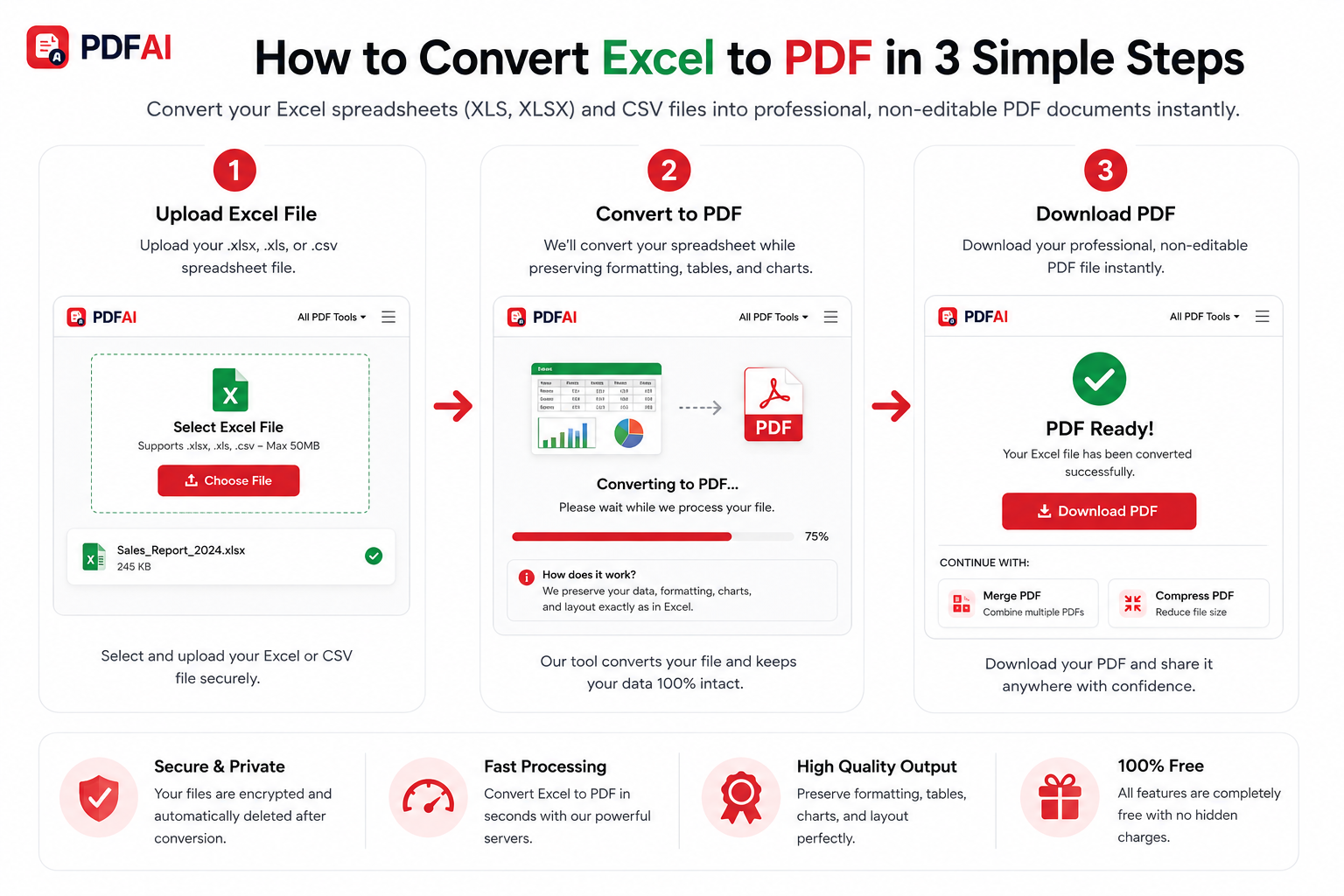
Step-by-step guide showing how to upload, auto-format, and download your spreadsheet as a professional PDF.
Why You Should Always Export to PDF
While Microsoft Excel is the industry standard for calculating and organizing data, it was never designed for universal document delivery. Converting to PDF solves several critical business problems:
Lock Your Data
Ensure nobody tampers with your calculations. A PDF acts as a read-only snapshot of your final data.
Perfect Print Layouts
PDFs lock the page layout, ensuring your wide tables don't get awkwardly cut in half across multiple printed pages.
Universal Access
Anyone can open a PDF directly on their smartphone, tablet, or browser without needing to install spreadsheet software.
Lightning Fast
No need to struggle with Excel's complex export settings. Our tool formats your sheet automatically in seconds.
How to Convert Your File (Step-by-Step)
You can execute this document conversion securely right from your web browser. No plugins or heavy software installations are required:
- Access the Tool: Navigate to the Excel to PDF converter on PDF AI.
- Upload Your Spreadsheet: Click the upload button or simply drag and drop your
.xlsx,.xls, or.csvfile into the drop zone. - Automatic Formatting: Our backend processor reads your sheet, preserves your cell colors, borders, and charts, and calculates the best page fit.
- Download PDF: Within moments, your formatted PDF document is ready. Click "Download" to save it to your device.
Frequently Asked Questions (FAQ)
Here are answers to the most common questions about converting spreadsheets to PDF:
Does this tool support CSV files?
Yes! In addition to standard Excel formats (.xlsx and .xls), our converter fully supports Comma Separated Values (.csv) files. We will automatically parse the data into a clean, readable grid format for your PDF.
How do you handle very wide Excel tables?
Our conversion engine utilizes intelligent scaling. It attempts to fit your columns onto a standard A4 or Letter page size in Landscape orientation so your data isn't disjointed. For incredibly large datasets, we recommend hiding unnecessary columns in Excel before uploading.
Will my charts and cell colors be preserved?
Absolutely. The PDF will reflect the exact visual layout of your Excel sheet, including background fill colors, bold text, borders, and embedded charts or graphs.
Ready to Secure Your Spreadsheet?
Upload your Excel or CSV file now and download a clean, formatted, and un-editable PDF document in seconds.