Quick Answer
To convert a PDF to Word online for free, upload your PDF file into the PDF AI converter, wait a few seconds for the engine to accurately map your text, tables, and images, and then instantly download your fully editable DOCX Word document. The process preserves original formatting without adding any watermarks.
Converting a flat, un-editable PDF into a fully functional Microsoft Word document no longer requires you to purchase expensive desktop software or spend hours manually retyping data. With PDF AI, you can seamlessly transform your PDFs into fully editable DOCX files in seconds while preserving complex formatting, embedded tables, high-resolution images, and text structures.
Table of Contents
We all know the sheer frustration of a locked document. You receive a contract, a polished resume template, or a massive business report in PDF format, but you instantly spot a glaring spelling mistake or need to quickly update some critical financial figures. Because PDFs are explicitly designed to lock content in place for printing and sharing, you simply can't click and type.
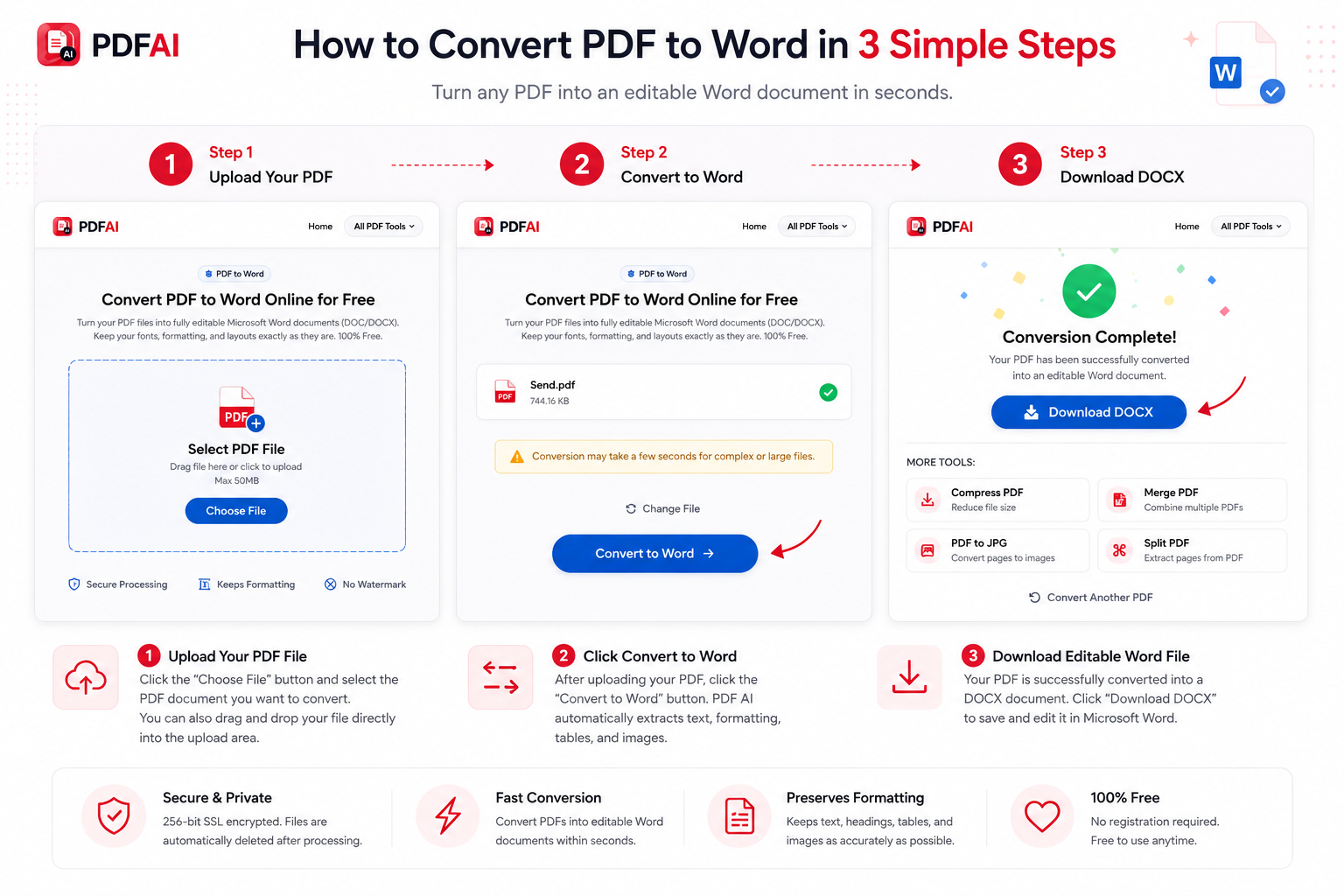
Step-by-step visual guide showing how to securely upload a PDF, convert it to a Microsoft Word file, and download the editable DOCX directly.
Why Format Retention Matters
Instead of manually retyping an entire multi-page document from scratch, using a dedicated pdf to docx converter is the only logical choice. However, the biggest challenge with generic free tools on the internet is that they completely mess up the formatting, severely misplace images, break table structures, or leave ugly, forced watermarks on your final files. Here is why choosing the best pdf to word converter matters:
- Save Hours of Time: A high-quality extraction engine keeps your tables, fonts, margins, and graphics exactly where they belong on the page.
- Resume Updates: Easily update older, outdated PDF resumes by turning them back into editable word document files to inject your latest job experience.
- Zero Re-typing: Extract thousands of words instantly without missing a single character or punctuation mark.
- Instant Collaboration: Word documents are much easier to share with team members using "Track Changes" mode for collaborative editing.
When Should You Convert PDF to Word?
If you are wondering whether you need to convert your file or simply use a basic text editor, here are the most common scenarios where our users urgently need to convert pdf to word free:
Can I Convert Scanned PDFs to Word?
One of the biggest hurdles in document management is dealing with scanned files. If someone takes a physical piece of paper and scans it using a printer or a phone app, the resulting PDF contains absolutely no digital text. It is essentially a flat photograph of the paper.
Standard converters will simply paste this image into a Word document, which is completely useless if you need to edit the text. To properly convert scanned pdf to word, you need Optical Character Recognition (OCR) technology.
OCR actively scans the image, detects the shapes of letters and words, and mathematically converts them back into fully editable digital text. If you have a scanned document or an image-based PDF, you should immediately use our specialized OCR to Word Converter to ensure accurate text extraction.
Comparison: PDF vs Word DOCX
Understanding the fundamental differences between these two file types helps clarify why conversion is so incredibly valuable in a professional environment:
| Document Aspect | Portable Document Format (PDF) | Microsoft Word (DOCX) |
|---|---|---|
| Core Purpose | Secure sharing, viewing, and exact printing. | Drafting, collaborative editing, and formatting. |
| Editability | (Requires special software) | |
| Layout Structure | Fixed Layout (Looks identical on every device) | Flexible Layout (Flows dynamically based on screen) |
| Content Control | Limited Changes allowed | Full Control over every character and margin |
Need to edit your PDF right now?
Upload your file to PDF AI. We convert it to a Microsoft Word format in seconds, keeping your layout perfectly intact. No registration required.
Convert to Word NowHow to Convert PDF to Word Online (Step-by-Step)
You can pdf to word online free directly from your web browser, bypassing the need for bulky software installations:
Data Security & Privacy
Enhance Your Workflow
Once you have finished editing your Word document, you might need to convert it back or perform other tasks. Check out our free utilities:
Frequently Asked Questions (FAQ)
Can I convert PDF to Word for free?
Yes! Our PDF to Word converter is 100% free to use. There are no hidden subscription fees, no paywalls, and no forced account registrations required to convert your files.
Will my document formatting stay the same?
Yes, we use an advanced layout-reconstruction engine to ensure that your paragraphs, bullet points, embedded tables, and images remain in their exact correct positions inside the newly generated DOCX file.
Can I convert scanned PDFs to Word?
Yes, but standard conversion won't make the text editable. For heavily scanned documents or image-based PDFs, you must use our dedicated OCR to Word Converter to extract and recognize the text digitally.
Does OCR actually work well?
Yes, Optical Character Recognition (OCR) is highly accurate, especially for scanned documents that have clear, well-lit, and high-resolution text. It automatically detects text patterns and translates them into an editable format.
Is there a watermark added to the Word file?
Absolutely not. We guarantee that no annoying watermarks, promotional logos, or third-party branding will ever be stamped onto your final downloaded Word documents.
Can I convert a PDF on my mobile phone?
Yes, PDF AI is fully cloud-based and responsive. You can upload a PDF directly from your iPhone or Android browser, convert it, and download the editable Word file straight to your phone's local storage.
Is PDF AI processing secure?
Your privacy is our top priority. We utilize 256-bit secure SSL encryption for all file transfers. Furthermore, any document you upload—and the resulting Word file—is automatically and permanently deleted from our servers post-conversion.
Can I edit the DOCX file immediately after conversion?
Yes, that is the entire purpose of the tool! Once you download the DOCX file, simply open it in Microsoft Word, Google Docs, Apple Pages, or LibreOffice, and you can edit every single word, delete images, or add new paragraphs freely.
Can I convert very large PDF files?
Yes, our free tier accommodates standard, heavy documents with ease. Even if your PDF spans dozens of pages, our servers will quickly process the conversion without crashing or slowing down your browser.
Does it work with complex tables and images?
Yes. Our extraction algorithm is specifically designed to recognize complex grid structures and high-resolution image placements, ensuring they are mapped correctly into the Word document rather than being jumbled together.