Quick Answer
To rotate a PDF online permanently, upload the file to the PDF AI rotation tool, visually select the specific pages that need fixing, rotate them 90°, 180°, or 270° clockwise or counter-clockwise, and download the correctly oriented document. This guarantees the file will open upright on all devices.
The fastest and most reliable way to fix an upside-down PDF is to use a dedicated PDF editor to permanently rotate the pages. This ensures the actual document architecture is updated, so whoever opens the file next sees it perfectly upright.
Table of Contents
We've all been there: You use a mobile scanner app or a bulky office printer to digitize a contract, but when you finally open the file on your computer, half the pages are upside down or sideways. Sending a sideways invoice or a scanned pdf to a client looks highly unprofessional, and twisting your neck to read it yourself is incredibly frustrating.
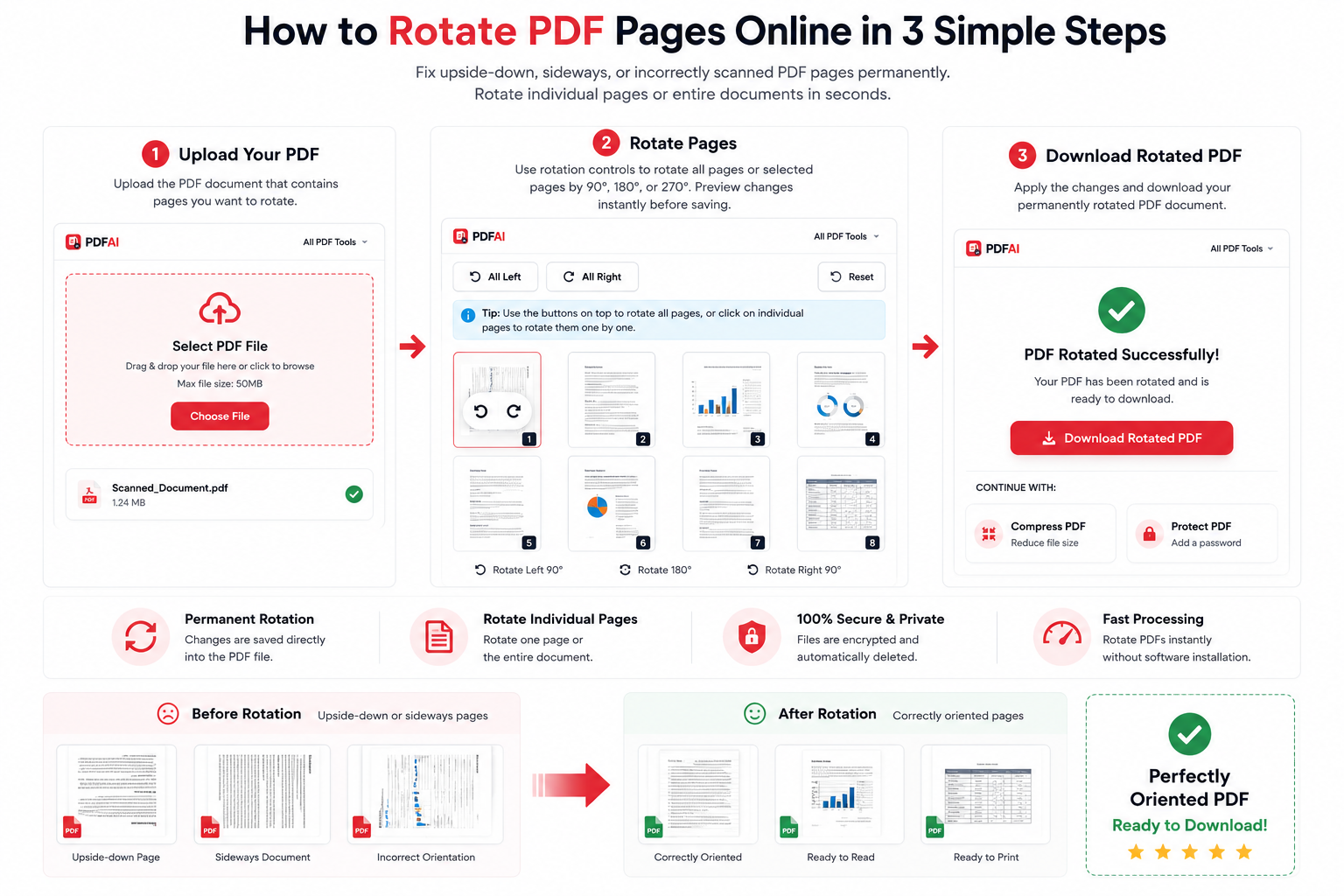
Our permanent rotation tool allows you to select individual pages or entire documents and fix their orientation instantly.
The Problem with "Temporary View" Rotation
You might have noticed that basic PDF readers like Adobe Acrobat Reader, Google Chrome, or Mac Preview allow you to rotate a document while you are looking at it. However, this only changes your temporary view.
If you close the file, reopen it later, or email it to a colleague, the document will completely revert to being upside down. To fix upside down pdf errors permanently, you need an online tool that actively rewrites the metadata of the PDF file to lock the new, correct orientation in place forever.
Why You Should Rotate PDF Pages Properly
Taking 30 seconds to properly orient your document using a tool to rotate pdf online free provides several immediate workflow benefits:
Permanent Save
Our tool modifies the core file data. Once rotated and downloaded, the document will open correctly on every device forever.
Target Specific Pages
Is only page 3 upside down? No problem. You can select and rotate individual pages without affecting the rest of your document.
Print Correctly
Avoid wasting paper and ink. A permanently rotated document ensures your physical printouts come out perfectly aligned every time.
Mobile Friendly
Fixing the orientation ensures that when you share the file via WhatsApp or email, the receiver can read it effortlessly on their smartphone.
Comparison: Temporary View vs Permanent Rotation
Still not sure why you shouldn't just use your browser's rotate button? Here is a clear breakdown of the difference:
| Feature | Temporary Rotation (Browser) | Permanent Rotation (PDF AI) |
|---|---|---|
| Saved After Closing | ||
| Works on All Devices | ||
| Email & Sharing Ready | ||
| Professional Appearance |
How to Rotate Your PDF (Step-by-Step)
You don't need to pay for or download heavy desktop software to fix a simple orientation error. You can securely rotate pdf without adobe right from your browser:
Data Security & File Privacy
What To Do After Rotating Your File
After you have successfully corrected the orientation of your pages, you might want to optimize the document further before emailing it. Check out our other free tools:
Frequently Asked Questions (FAQ)
Why does my PDF go back to being upside down when I email it?
If you used a basic PDF viewer (like a web browser or Mac Preview) to rotate the document, you only rotated your personal screen view, not the actual file metadata. To fix it permanently so others see it correctly, you must use a dedicated PDF editor to apply and save the rotation.
Can I rotate just one page instead of the whole document?
Yes! Our tool provides visual thumbnails for every page in your document. You can easily select a single page and rotate only that one, leaving the properly oriented pages completely untouched.
Can I rotate all pages in my PDF at once?
Absolutely. If the entire document was scanned backwards, you can use the 'Rotate All' feature to flip every single page 90 or 180 degrees simultaneously before saving the file.
Can I rotate my PDF on my mobile phone?
Yes, PDF AI is fully responsive. You can open Safari or Chrome on your iPhone or Android device, upload the PDF, tap the rotate icons on your touchscreen, and download the fixed file instantly.
Can I rotate a PDF without Adobe Acrobat?
Yes, you do not need to install heavy or expensive desktop software like Adobe Acrobat. Our web-based rotation tool runs entirely in the cloud and processes your files for free.
Will rotating my PDF reduce its visual quality?
No. Rotating a PDF simply updates the orientation metadata within the file's internal architecture. It does not compress, blur, or alter the resolution of the text or images inside your document.
Can I rotate a password-protected PDF?
If the document is locked against editing, you will need to unlock it first. You can use our Unlock PDF tool to remove the password, and then rotate the pages.
Is the PDF AI rotation tool completely free?
Yes, rotating pages is a core feature of our platform that is 100% free to use. There are no paywalls, hidden subscriptions, or ugly watermarks added to your corrected document.
Fix Your Document Orientation Now
Upload your messy PDF, apply a permanent rotation to your pages, and download a professional, upright document in seconds.