AI Summarizer Quick Answer
To summarize a PDF online, simply upload your document to our free AI PDF Summarizer. The AI will instantly generate an overview and extract key bullet points. You can then use the built-in chat interface to ask specific questions about the document securely, with absolute data privacy.
We've all been there: staring at a 50-page research paper, a dense legal contract, or a lengthy financial report, wondering how to find the exact information we need without spending hours reading every single line. In the modern workflow, time is your most valuable asset.
Enter the AI PDF Summarizer. Instead of manually skimming through walls of text, you can now let artificial intelligence read, analyze, and break down your documents into bite-sized, actionable insights in a matter of seconds.
Table of Contents
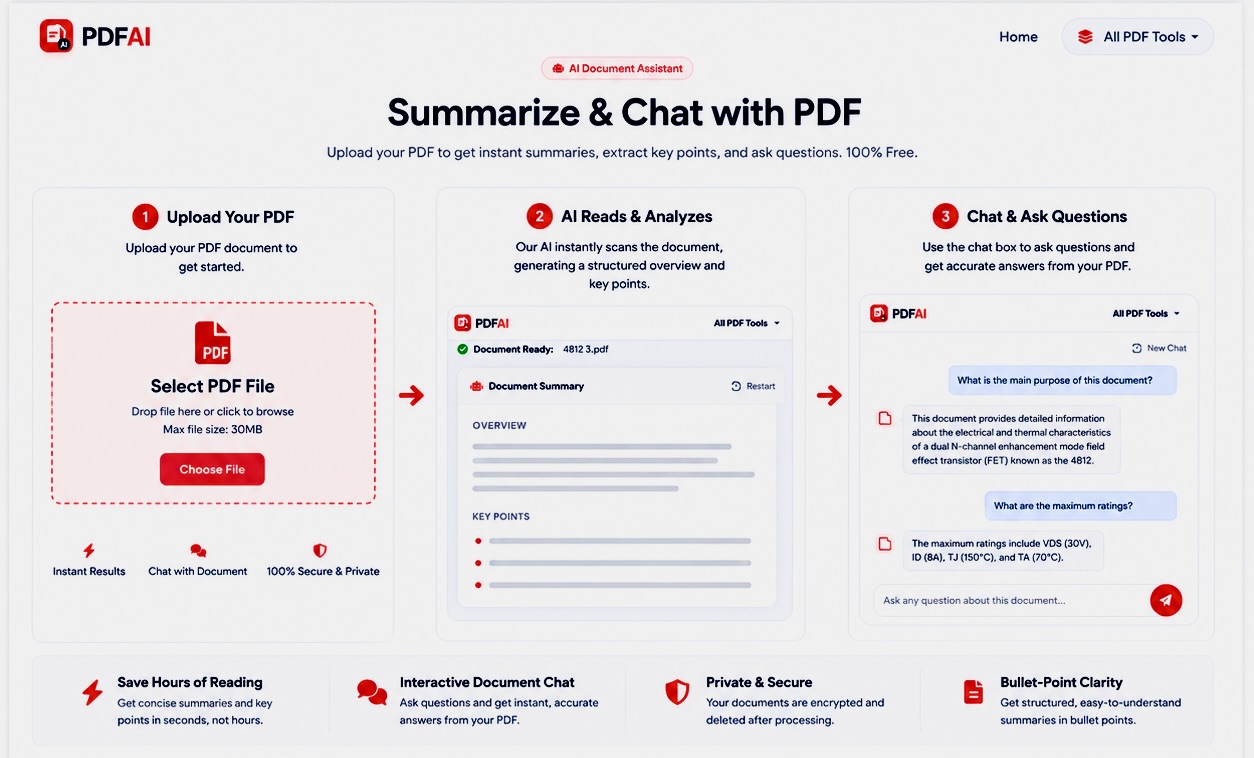
Step-by-step guide showing how to upload, summarize and chat with your PDF file using PDF AI.
Why Use an AI PDF Summarizer?
Reading complex documents isn't just time-consuming; it's exhausting. Our Summarize & Chat tool changes the way you interact with files. Here is what makes it a game-changer:
- Instant Overviews: Upload your file and instantly receive a structured overview of what the document is actually about.
- Bullet-Point Key Takeaways: Skip the fluff. The AI extracts the most critical arguments, data points, and conclusions into an easy-to-read list.
- Interactive Chat: This is where the magic happens. Don't just read the summary—talk to the document. You can type questions like "What is the total revenue mentioned in Q3?" and the AI will answer based strictly on the document's contents.
Common Extraction Use Cases
Who benefits the most from an AI document assistant? Almost any professional dealing with heavy paperwork:
The Difference It Makes
Here is a real, measurable example of what our chat with PDF tool can achieve when handling dense information:
Not only do you save massive amounts of time, but you also eliminate human error when searching for specific clauses or numbers buried deep within pages.
Ready to talk to your documents?
Stop wasting time skimming. Upload your first PDF and get an AI summary in seconds. Secure, private, and free.
Try AI Summarizer NowHow to Chat With Your PDF — 3 Simple Steps
We built our tool to be incredibly intuitive. You don't need to sign up, install any software, or pay premium subscription fees.
Why Choose PDF AI's Summarizer?
There are countless AI tools online, but PDF AI guarantees high performance while prioritizing your absolute privacy. Let's compare our utility to standard platforms.
| Feature | PDF AI Summarizer | Generic AI Chatbots |
|---|---|---|
| Document Privacy | ||
| 100% Free Use | ||
| No Registration | ||
| Hallucination Control |
When you upload a confidential business contract or a personal bank statement, you need a guarantee that your data won't end up on public servers. We process all uploads via robust 256-bit SSL encryption, and files are permanently deleted right after your session ends.
Do More With Your Documents
Need to do more than just summarize? Explore our full suite of free document manipulation tools:
Frequently Asked Questions (FAQ)
Is the AI Summarizer actually free?
Yes, the AI summarization tool provided by PDF AI is completely free to use. There are no hidden fees, paywalls, or premium subscriptions required to chat with your document.
What is the maximum file size I can upload?
For the AI Summarizer and Chat tool, the maximum file size is 30 MB. This ensures that the AI can process and return answers quickly without timing out.
Is my document safe and private?
Yes, your security is guaranteed. We process all uploads via robust 256-bit SSL encryption. We also run a strict auto-deletion protocol—your original files and generated summaries are permanently deleted from our servers shortly after processing.
What kind of questions can I ask the AI?
You can ask any question based on the content of the uploaded PDF. For example: "What is the total revenue mentioned?", "Summarize page 3", or "List all the names mentioned in this contract."
Will the AI use my document to train its models?
No. Your documents are NEVER used to train generic, public AI models. The context is strictly locked to your current session and destroyed afterward.