Quick Answer
To convert a PDF to PDF/A online for long-term archiving, upload your document into the PDF AI converter. Our engine will automatically embed missing fonts, calibrate ICC color profiles, and remove forbidden elements (like JavaScript). Within seconds, download your strict ISO 19005-2 compliant PDF/A-2b file, which is fully VeraPDF validated and 100% free.
When submitting documents to government courts, university thesis portals, or corporate archives, standard PDFs are often rejected. Institutions demand that you convert your files to the highly strict, long-term preservation format known as PDF/A.
Table of Contents
- What is the long-term PDF storage format?
- Why Do Normal PDFs Fail Archiving?
- Who Needs an ISO 19005 PDF tool?
- PDF AI vs Premium Desktop Software
- Understanding PDF/A Versions (A-1, A-2, A-3)
- How to Use the Archival PDF Converter (Step-by-Step)
- Data Security & File Privacy
- Enhance Your Archiving Workflow
- Frequently Asked Questions (FAQ)
Most standard free tools on the internet simply rename your file extension without actually changing the internal architecture, resulting in failed VeraPDF compliance checks. Using a professional archival PDF converter ensures that your fonts are embedded, colors are standardized, and your file meets exact ISO 19005 regulations.
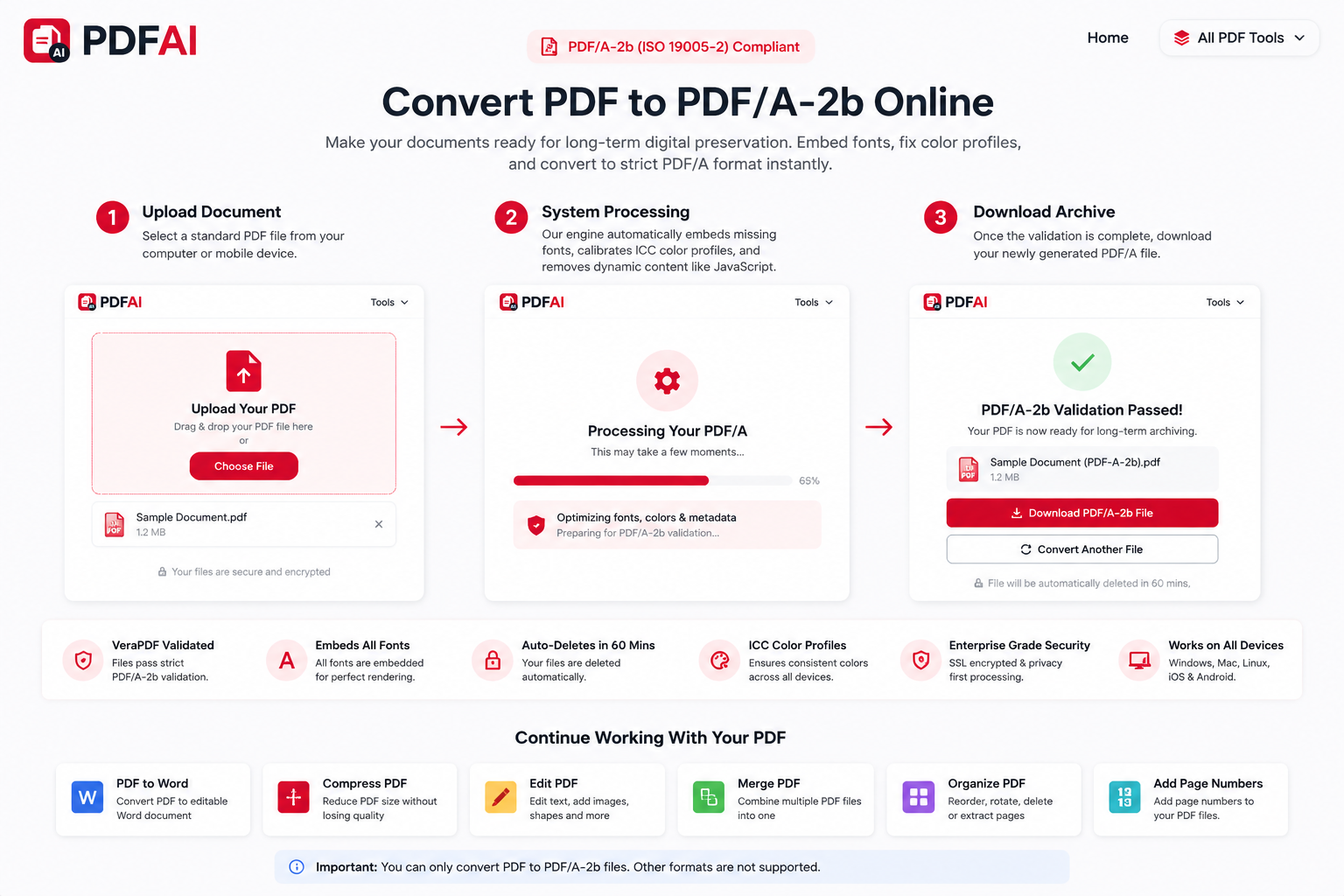
Our automated conversion engine modifies your file's internal architecture to meet strict ISO preservation standards.
What is the long-term PDF storage format?
PDF/A (Portable Document Format for Archiving) is an ISO-standardized version of the PDF format (ISO 19005). Its singular goal is digital preservation. When you open a normal PDF today, it might look perfectly fine. But what happens if you try to open it 50 years from now? If the fonts you used are no longer installed on future computers, the text will break.
To prevent this, the PDF/A standard strictly forbids features that are ill-suited for long-term survival. It forces all necessary data (fonts, colors, text) to be physically stored inside the file itself.
Why Do Normal PDFs Fail Archiving?
When you try to submit a standard document to a court e-filing system, it often gets bounced back. Here is why normal files fail, and how our ISO 19005 PDF tool automatically fixes them:
Missing Embedded Fonts
Normal PDFs link to system fonts. Our engine subset-embeds all required fonts directly into the document stream so they render perfectly on any future machine.
Uncalibrated Colors
PDF/A requires device-independent colors. Our converter applies standardized ICC profiles (like sRGB) to guarantee the colors print exactly as intended decades later.
Dynamic Content (JavaScript)
Code, audio, and video files are forbidden in archives because they pose security risks and rely on external players. We safely strip them out.
Encryption Restrictions
Password-protected PDFs cannot be archived because future archivists might lose the password. We ensure the final file is accessible.
Before archiving, if you need to fix a typo or add signatures, use our Edit PDF tool first to finalize the content.
Who Needs an ISO 19005 PDF tool?
Converting a standard file into a strict long-term PDF storage format is rarely done casually. It is usually a strict mandate from authoritative bodies. The most frequent users of our tool include:
Comparison: PDF AI vs Premium Desktop Software
You can certainly use expensive desktop software to perform this conversion, but why pay a premium? Here is how PDF AI stacks up against the competition:
| Feature | PDF AI | Premium Desktop Software | Standard Free Tools |
|---|---|---|---|
| Cost | |||
| VeraPDF Validation | |||
| Installation Required | |||
| Auto Font Embedding |
Understanding PDF/A Versions (A-1, A-2, A-3)
When you use an archival PDF converter online, you might see different compliance levels. Here is a quick breakdown to avoid confusion:
- PDF/A-1b (Older): The original 2005 standard. It does not support transparency or JPEG2000 compression, making files larger and sometimes altering the visual look of transparent graphics.
- PDF/A-2b (Recommended): The modern 2011 standard (ISO 19005-2). It supports transparent layers, modern image compression, and digital signatures. This is the format PDF AI generates.
- PDF/A-3b (Specialized): Same as A-2b, but allows embedding of non-PDF files (like XML or Excel files) inside the document. Only used for very specific invoicing standards like ZUGFeRD.
Ready to Archive Your Document?
Upload your file to PDF AI. We will securely rewrite the file architecture to meet strict ISO 19005-2 standards in seconds without installing expensive software.
Start Free ConversionHow to Use the Archival PDF Converter (Step-by-Step)
Forget about downloading heavy compliance software. You can validate and convert your files securely from your browser in three simple steps:
If your thesis or legal bundle is incredibly large, consider running it through our PDF Compressor tool before converting it to an archive format.
Data Security & File Privacy
Enhance Your Archiving Workflow
Before you commit your document to a permanent archive, you might want to finalize its layout or size. You can easily merge PDF files into a single comprehensive document before creating the final archive. Explore our other free tools:
Frequently Asked Questions (FAQ)
What is the main difference between PDF and PDF/A?
PDF/A is a specialized, restricted version of a normal PDF. While normal PDFs can rely on external fonts and dynamic content, PDF/A strictly embeds all text, fonts, and colors inside the file itself to guarantee the document will open and look exactly the same 100 years from now.
Will the file generated by PDF AI pass VeraPDF compliance?
Yes. Our backend conversion engine is specifically calibrated to meet ISO 19005-2 standards. The resulting PDF/A-2b files are structurally sound and will pass VeraPDF and other rigorous institutional compliance checkers.
Does converting to PDF/A increase the file size?
Yes, usually slightly. Because the PDF/A standard forces the document to physically embed all font data and ICC color profiles into the file (rather than linking to your computer's system fonts), the final file size is typically marginally larger than the original.
Is PDF AI's archival converter really free to use?
Absolutely. You can convert your standard PDFs to archival PDF/A formats 100% free of charge. We do not require you to create an account, enter a credit card, or deal with annoying watermarks on your professional documents.
Can I convert a password-protected PDF to PDF/A?
No, the ISO standard strictly forbids encryption in PDF/A files because future archivists might lose the password, rendering the document unreadable. You must use our Unlock PDF tool to remove the password first before converting.
Which PDF/A version do you support?
PDF AI converts documents to PDF/A-2b (ISO 19005-2). This is the most widely accepted modern standard by courts, universities, and governments because it successfully supports transparent image layers while ensuring long-term visual fidelity.
Is there a file size limit for uploads?
Our secure servers are robust enough to accept very heavy document uploads up to 200MB. If your thesis or legal bundle is incredibly large, consider running it through our PDF Compressor tool before converting it to an archive format.
Is my sensitive data secure during conversion?
Yes. We use advanced SSL encryption for all file transfers. We operate on a strict privacy-first architecture, meaning your uploaded files and generated archives are automatically removed from our processing directories within an hour.