Quick Answer
To convert a PDF to PNG online for free without losing resolution, use the PDF AI PDF to PNG Tool. Simply upload your PDF file, and our engine will extract every single page into high-quality, lossless PNG images. Unlike other tools, we do not add watermarks, we preserve crisp text formatting, and we automatically package all your images into an easy-to-download ZIP file.
PDFs are universally accepted for documents, but they are notoriously difficult to embed directly into web pages, social media platforms, or presentation slides. If you want to share a specific page of a PDF seamlessly, converting it to an image format is the best solution.
However, choosing the right image format is critical. While many people default to JPG, converting a text-heavy or chart-heavy PDF to JPG often results in blurry edges and compression artifacts. This is where PNG (Portable Network Graphics) steps in as the superior choice.
Table of Contents
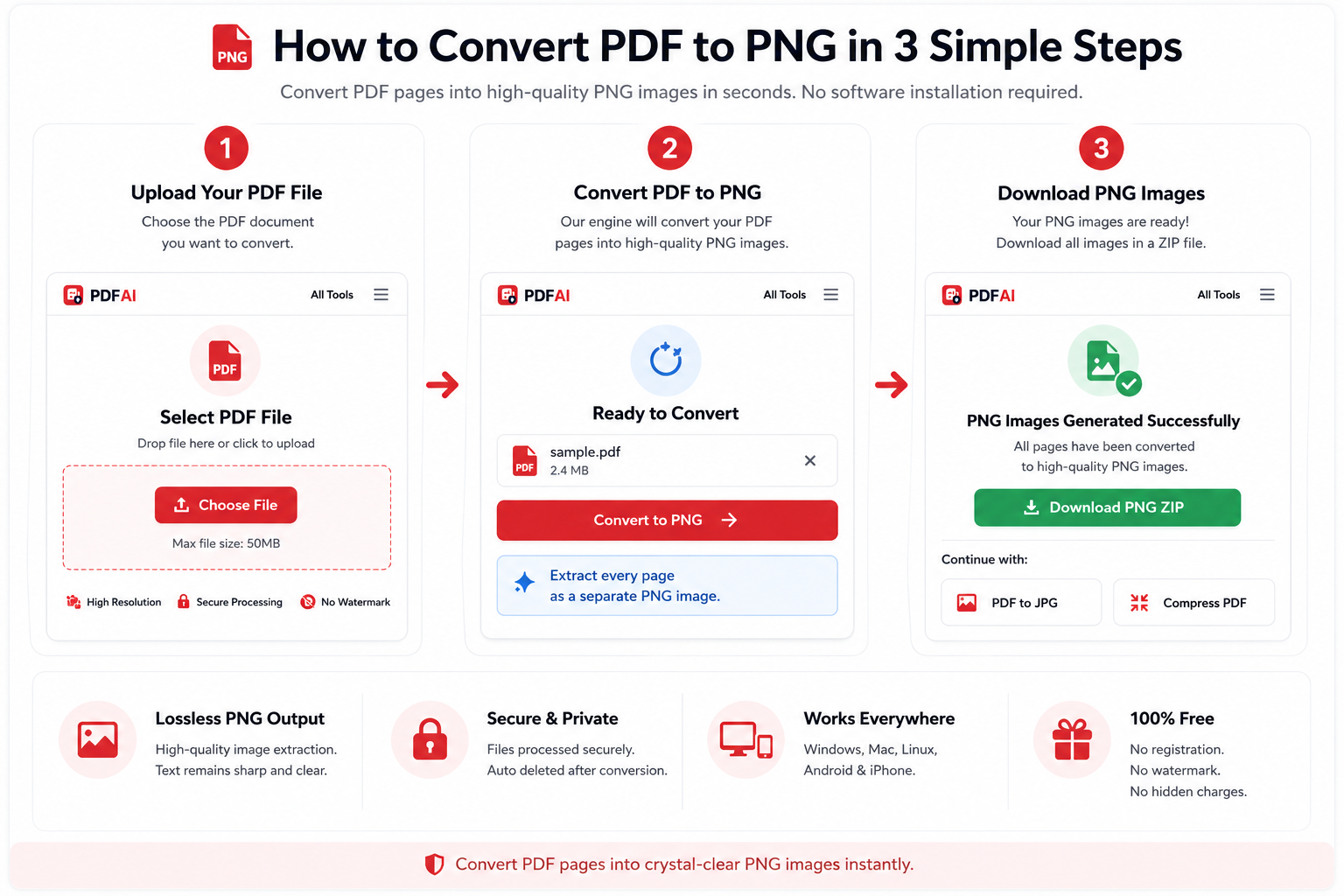
Our automated conversion engine extracts PDF pages into crisp, high-resolution PNGs.
What is a PNG and Why Choose It Over JPG?
Before converting your document, it is essential to understand the underlying technology. PNG stands for Portable Network Graphics. It is a raster-graphics file format that supports lossless data compression. Originally developed as an improved, non-patented replacement for Graphics Interchange Format (GIF), PNG has become the gold standard for high-quality web images.
When you convert a PDF into an image, you are fundamentally rasterizing vector data (like fonts and SVG shapes) into pixels. Here is why PNG outperforms JPG in almost every document-conversion scenario:
Lossless Compression
Unlike JPG, which uses discrete cosine transform (DCT) lossy algorithms that discard data to save space, PNG uses DEFLATE compression. This means 100% of the original image data is preserved.
Crisp Text Rendering
JPGs notoriously struggle with high-contrast edges (like black text on a white background), resulting in "haloing" or blurriness. PNG maintains razor-sharp edges, making it perfect for documents.
Transparency Support
PNG supports alpha channels (transparency). If your PDF contains transparent backgrounds or isolated graphics, PNG can preserve those layers, whereas JPG will force a solid white background.
Wide Color Gamut
PNG supports 24-bit RGB and 32-bit RGBA color spaces, ensuring that the vibrant colors in your PDF charts, graphs, and digital illustrations translate perfectly to the image format.
Why PDF AI is a Better Choice
Many online converters focus on speed, but users often care about image quality, privacy, and ease of use. Here are some of the key advantages of PDF AI.
| Feature | PDF AI | Typical Free Tools |
|---|---|---|
| High Resolution Output | ||
| No Watermarks | ||
| ZIP Download | ||
| No Installation Required | ||
| Works on Mobile & Desktop | ||
| Secure File Processing |
PDF AI is designed to make PDF to PNG conversion simple, fast, and reliable. Whether you're converting a single-page document or a multi-page report, the tool preserves image clarity while keeping the process straightforward.
Common Use Cases for PDF to PNG Conversion
Why do millions of users convert their documents to PNGs every month? The use cases span across various professional and personal industries:
How to Convert PDF to PNG (Step-by-Step)
We designed our converter to be frictionless. There is no software to install, no limits to worry about, and no technical knowledge required. Follow these steps to extract your images:
If your PDF is encrypted or password-protected, our client-side scanner will detect it instantly. You will be prompted to use our Unlock PDF tool to remove the password before the conversion can begin.
Extract High-Quality Images Now
Turn your multipage PDF reports, presentations, and ebooks into crisp, lossless PNG images in seconds. No daily limits, no hidden fees.
Go to PDF to PNG ConverterAdvanced Tips for High-Quality Extraction
If you are an advanced user, you might be wondering about the technical specifics of rasterization. When a vector PDF is converted to a raster PNG, the engine must decide on a scale layer or internal DPI parameters to capture properties effectively.
PDF AI automatically selects an appropriate rendering resolution based on the size and complexity of the document. This helps maintain image quality while keeping file sizes practical and conversion speeds fast.
Privacy, Security, and Data Policies
Enhance Your PDF Workflow
Converting to PNG is just one part of a robust document workflow. Often, you may need to manipulate the PDF before extracting its pages. Explore our other free, AI-powered tools to manage your documents effectively:
Frequently Asked Questions (FAQ)
Will I lose quality when converting PDF to PNG?
No, our tool extracts pages at a high resolution. Because PNG is a lossless format, it ensures that text remains sharp, lines stay crisp, and images look identical to the original PDF without any compression artifacts.
Why should I choose PNG over JPG for my PDFs?
JPG uses lossy compression, which is fine for photographs but terrible for documents. It introduces blurriness around text. PNG is lossless and handles solid colors, text, and logos perfectly. If your PDF has charts, graphs, or text, PNG is always the superior choice.
How do I download multiple images at once?
If your PDF has multiple pages (for example, a 50-page ebook), our system automatically processes every page and packages all 50 PNG images into a single ZIP folder. You only need to click download once.
Is this tool completely free to use?
Yes, converting PDF files to PNG images is 100% free. There are no hidden costs, no premium tiers for high resolution, no subscription requirements, and absolutely no watermarks stamped onto your final images.
Can I convert a password-protected PDF to PNG?
Our system respects encryption. If your PDF is locked with a password, our client-side scanner will detect it and alert you. You will need to use our free Unlock PDF tool to remove the password before uploading it for image extraction.
How long does the conversion process take?
Most conversions take less than 5 seconds. However, if you are uploading a massive document with hundreds of pages, it might take a bit longer. Our UI features a smart progress bar that keeps you updated in real-time.
Are my files secure and private?
Absolutely. We use 256-bit SSL encryption for all file transfers. Furthermore, your original PDFs and the converted ZIP files are permanently and automatically deleted from our servers based on our modern data retention policies.
Does this work on Mac, iOS, and Android?
Yes! Our PDF to PNG converter is entirely cloud-based. It works flawlessly on any operating system (Windows, Mac, Linux) and across any mobile device browser (Safari, Chrome, Firefox) without requiring any app installations.
Can I convert only specific pages of a PDF to PNG?
Yes. Depending on the tool settings, you can convert selected pages or the entire document into PNG images.